

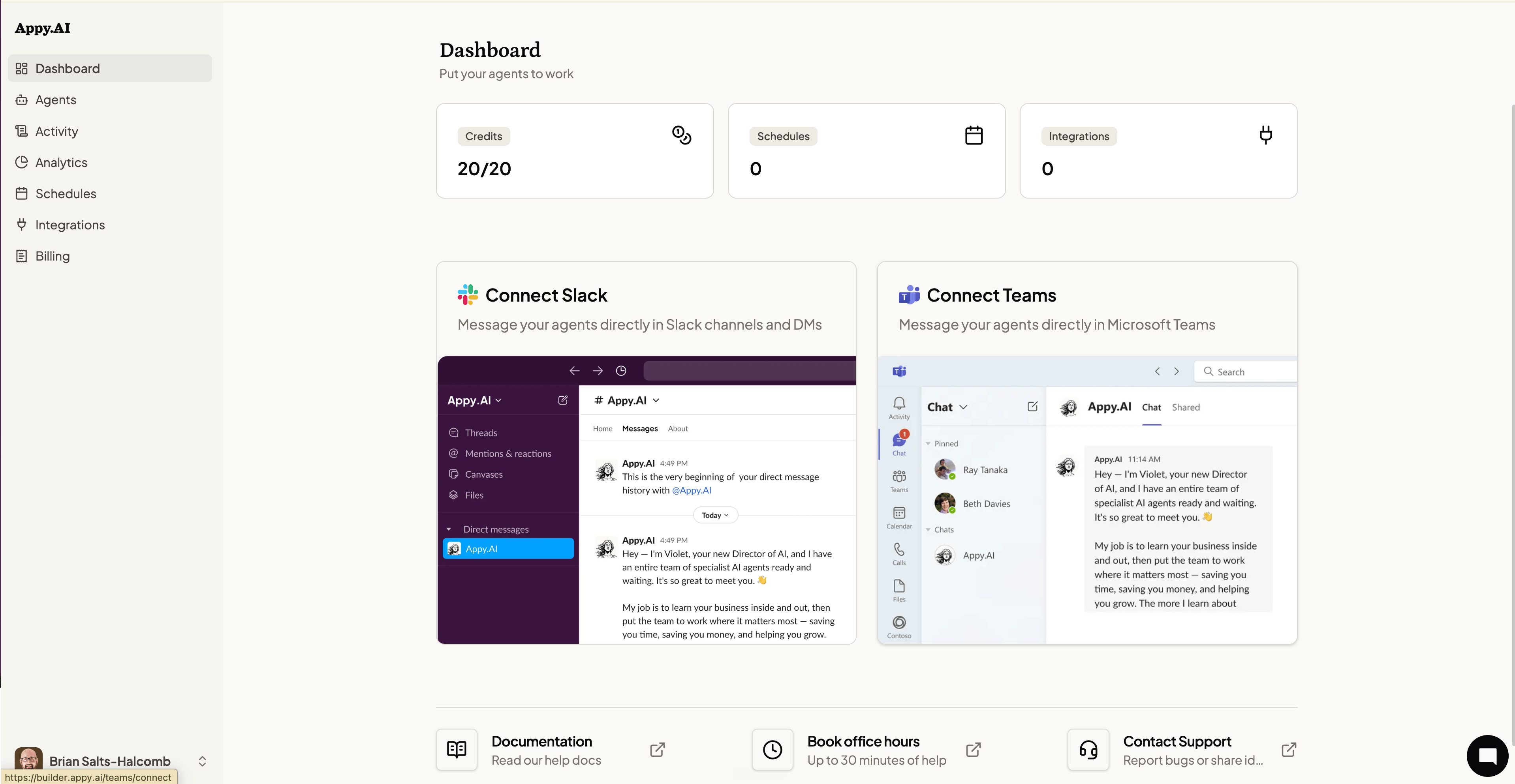
At a glance
Three summary tiles sit at the top of the Dashboard:- Credits — Your combined credit balance: your plan’s monthly allowance plus any reward credits you’ve earned, shown as a single total. Credits refresh on your billing cycle.
- Schedules — The number of active scheduled tasks your agents are running automatically.
- Integrations — How many third-party tools your agents are connected to.
Reward credits
Reward credits are bonus credits earned separately from your plan’s monthly allowance — for example, through referrals. They’re folded into the total shown on this tile, but if you want to see the reward balance on its own, check the Billing page, where it’s broken out as its own line.Connect your communication channels
If you haven’t set up Slack or Microsoft Teams yet, the Dashboard walks you through it. Your agents live in chat — connecting a channel is what lets you talk to them.- Connect Slack — Install the Appy.AI app in your workspace to message agents directly in channels and DMs.
- Connect Teams — Add Appy.AI to Microsoft Teams to run agents from any chat or channel.
Quick links
At the bottom of the Dashboard:- Documentation — Opens this help center in a new tab.
- Book office hours — Schedule up to 30 minutes with the Appy.AI team for hands-on help.
- Contact Support — Report a bug or share feedback directly with the team.