

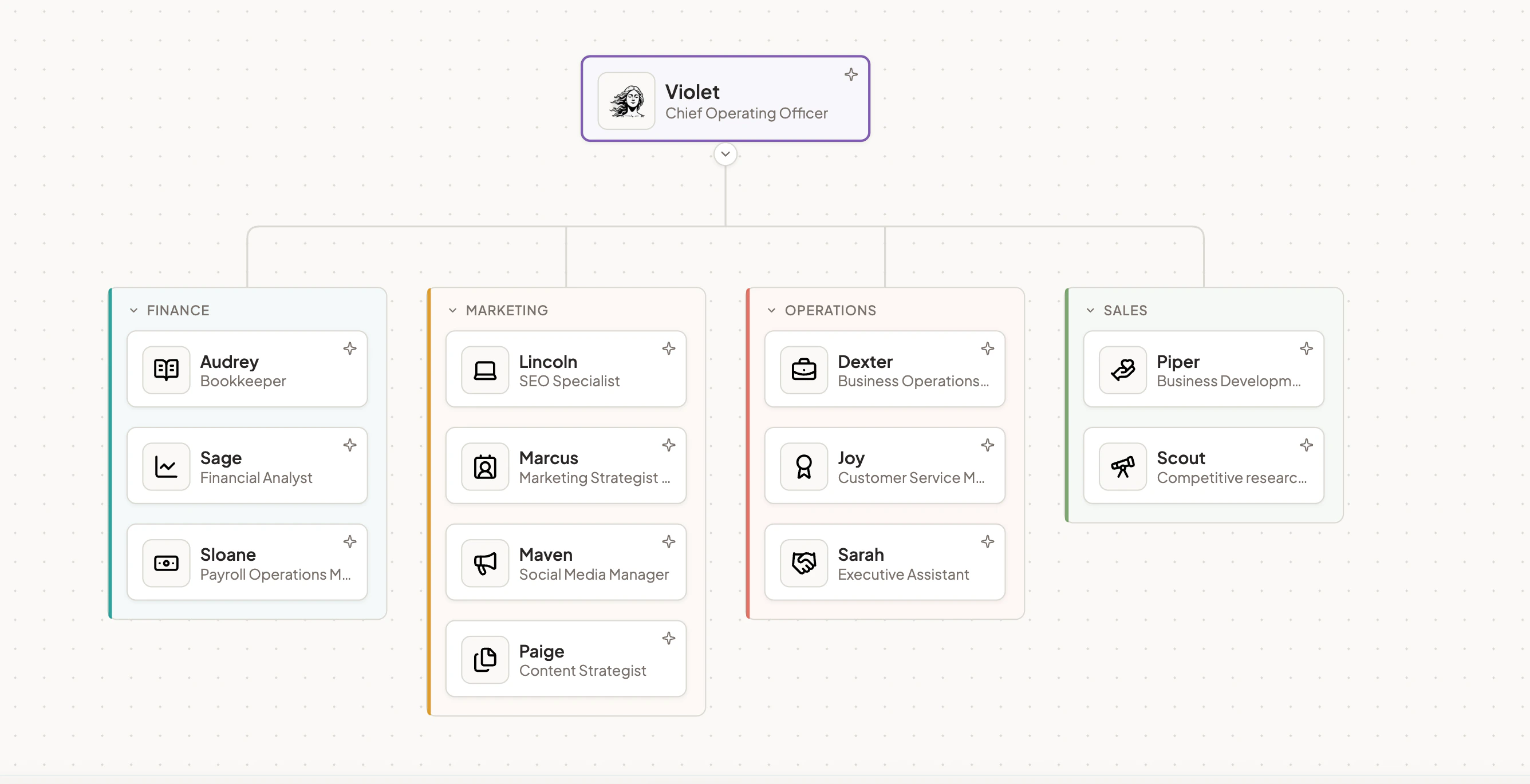
Meet Violet, your Director of Appy.AI
Violet is the one you talk to. She holds a running picture of how your business operates — the tools, the rhythms, the open questions, what matters this week — and uses it to brief the right specialist for every job. Most AI assistants wait to be told what to do. Violet leads, suggests, and pushes back. She earns trust the way a great manager does: by knowing your business well enough that her recommendations land.What she does
Holds the picture. Continuously builds a model of how your business operates — products, customers, tools, decisions in flight — so every brief lands with full context. Routes the work. Hears what you need, picks the right specialist, writes the brief, and brings back the result. You don’t manage the handoff. Asks the right question. When she needs to clarify, it’s one sharp question — not a survey. Knowing what to ask is most of the value. Orchestrates the chain. When a job needs Marcus to position, then Paige to write, then Maven to repurpose — Violet runs the sequence. You see the finished work. Hires, mentors, and fires. Spin up bespoke specialists when a job doesn’t fit the existing team. Update an agent’s playbook in plain language and the change takes effect immediately. Archive what you’re not using.Your other AI team members
[MARKETING] Lincoln — SEO Specialist
[MARKETING] Lincoln — SEO Specialist
Lincoln reads your site the way a crawler does — raw HTML, head signals, JSON-LD blocks, redirect chains, sitemap — and tells you the highest-leverage fix to make first. He doesn’t ship the kind of SEO audit that’s 80 pages of dashboard screenshots and zero recommendations. He ships the one paragraph that says fix this, ship this, kill this — in that order.Most SEO advice is noise. Lincoln cuts it.
What he does
- Reads the site as the crawler sees it. What Google actually indexes is the source of truth. Lincoln fetches the page, greps the head, checks the schema, traces the redirects — before he claims anything is broken.
- Builds keyword strategy grounded in real demand. Finds the searches you should be ranking for that you’re not. Cuts the vanity keywords. Maps intent to existing pages so the work is editing, not endlessly creating.
- Writes the schema markup. JSON-LD for product, FAQ, article, organization, breadcrumb — the structured data that wins rich results and AI Overview citations.
- Maps content architecture. Topic clusters, internal linking, page hierarchy — so authority compounds instead of getting scattered across 200 thin pages.
- Stays current on AI search. Generative Engine Optimization, AI Overviews, LLM-driven discovery — the playbook is shifting, and Lincoln’s advice anticipates where search is going, not where it’s been.
What he delivers
- Technical SEO audit reports (PDF) with prioritized recommendations
- Keyword strategy documents grounded in real search demand
- On-page optimization plans, page by page
- JSON-LD schema markup ready to drop into your site
- Content architecture maps (pillars, clusters, internal linking)
- Programmatic SEO blueprints
Best with
- Site access — Direct URL fetching (built in — no integration needed)
- Search analytics — Google Search Console, Google Analytics (for query and traffic data)
- CMS / publishing — WordPress, Webflow, HubSpot CMS (so recommendations can be picked up as tasks)
- Document storage — Google Drive, OneDrive (for sharing the audit PDF)
- Delivery — Slack, Microsoft Teams, email
How it works
Point Lincoln at a URL, brief him on the goal (audit, keyword strategy, schema, content architecture), and he produces a PDF you can read in ten minutes and act on this week. Recommendations come with priority and impact. Speculation gets cut.Try him with
- “Audit our homepage for SEO and tell me what to fix first.”
- “Find 10 keywords we should be ranking for that we’re not.”
- “Write the JSON-LD schema for our pricing page.”
- “Map a content cluster around [topic] — pillar plus supporting pages.”
- “Is our site set up to win AI Overview citations? What’s missing?”
[MARKETING] Marcus — Brand Strategist
[MARKETING] Marcus — Brand Strategist
Marcus builds the strategic foundation your marketing, sales, and design teams execute against. Positioning, messaging architecture, voice and tone, audience profiles, naming — the decisions everyone downstream needs to know but nobody has time to make. He doesn’t ship a workshop deck. He ships a Core Claim, defended, with ready-to-paste copy proving the strategy can land.Most positioning is crowded because nobody chose. Marcus chooses.
What he does
- Owns the strategic answer. Where to position. Who to serve. What to claim. The position no other competitor could honestly say. He picks one and defends it — instead of listing five and asking you to.
- Passes the Only test. “We are the only [category] that [differentiator].” If three competitors could fill the same blank, the positioning isn’t done. He sharpens until it is.
- Speaks in the audience’s language. Customers say “my last vendor ghosted me,” not “service consistency challenges.” The words come from research, not internal decks.
- Anchors on structural advantage. Proprietary methodology, audience specialization, integration depth, point of view — the things that compound. Cuts feature claims and “best customer support” theater.
- Ships strategy you can paste. Every position recommendation comes with the homepage hero, the about-page opener, the sales-email subject line — proof the strategy survives contact with real copy.
What he delivers
- Positioning documents with the Core Claim, defended
- Messaging architecture (audience, problem, promise, proof)
- Voice and tone guidelines with examples
- Audience profiles grounded in real customer language
- Naming strategy (products, features, categories)
- Marketing-psychology audits (what your current copy says vs. what it should)
- Ready-to-paste hero, about, and sales copy
Best with
- Research source material — Google Drive, OneDrive, Notion (so he can read customer interviews, testimonials, and current site copy)
- Web access — Direct site reads, competitor pages (built in)
- CRM context — HubSpot, Salesforce (for win-loss notes and deal language)
- Delivery — Slack, Microsoft Teams, email; outputs delivered as PDF or doc
How it works
Brief Marcus with what you have — current site copy, customer interviews, win-loss notes, competitor URLs — and he builds the position. He’ll push back if your differentiator doesn’t survive the Only test. The deliverable is always a decision, defended, with the first piece of paste-able copy attached.Try him with
- “Position our product against [competitor] in a one-pager.”
- “Build a messaging framework for our next launch.”
- “Audit our website copy for buyer-psychology gaps.”
- “Name our new [feature/category] — give me three options with rationale.”
- “Rewrite our homepage hero — make it pass the Only test.”
[MARKETING] Paige — Content Strategist
[MARKETING] Paige — Content Strategist
Paige runs your content engine end-to-end — editorial pillars, calendar, long-form copy, visuals, repurposing, measurement. She treats content as a brand-as-publisher operation, not a traffic farm. One opinionated piece with the right visual outperforms five generic ones, and Paige knows which one to ship.She does the strategy and the craft. No handoff in between.
What she does
- Leads with a point of view. Generic content is the dominant failure mode. Paige finds the line worth taking and makes sure every piece reinforces it.
- Ships the system, not just the piece. Editorial calendar, voice and tone, pillar/cluster map, repurposing flow, measurement loop. The piece is execution; the engine is the deliverable.
- Writes copy and conceives the visual together. Most teams write first and brief a designer second — that’s where voice dies. Paige treats the visual as part of the message.
- Builds for the channel. A blog post and a LinkedIn carousel are different artifacts even with the same topic. Channel-native versions get planned in the brief, not retrofitted at the end.
- Applies editorial judgment, not just the prompt. AI accelerates production. The thing AI can’t do is reject the off-voice draft, the lazy pillar, the safe headline. That’s where Paige’s value lives.
What she delivers
- 90-day editorial calendars with pillars and cadence
- Landing page copy (long-form, opinionated, channel-aware)
- Blog posts and email sequences using proven frameworks
- Content briefs (so even a junior writer can produce on-voice)
- Hero images, blog illustrations, social-ready visuals
- Pillar/cluster maps for SEO + content alignment
- Repurposing plans (long-form → email → social → newsletter)
- Content audits with kill/keep/revise calls
Best with
- Document storage — Google Drive, OneDrive (for source material and finished docs)
- Web access — Direct site reads, competitor content (built in)
- CMS / publishing — WordPress, Webflow, HubSpot CMS, Ghost
- Email platforms — Mailchimp, Beehiiv, ConvertKit (for sequences)
- Image generation — Built in (no setup required)
- Delivery — Slack, Microsoft Teams, email; long-form delivered as Google Doc or PDF
How it works
Brief Paige on the business outcome (pipeline, brand, audience growth) and the channel, and she produces a system and the first artifact. You review, she iterates. The cadence becomes a rhythm — calendar set, pieces shipped, repurposing flow active.Try her with
- “Build a 90-day editorial calendar for our blog.”
- “Write the landing page copy for our enterprise tier.”
- “Repurpose last month’s webinar into four blog posts and a newsletter.”
- “Audit our blog — what should we kill, keep, revise?”
- “Create a hero image for our new pricing page.”
[SALES] Piper — Business Development Specialist
[SALES] Piper — Business Development Specialist
Piper doesn’t ship a list of 500 leads. She ships a list of 15 right ones, with the trigger that earns the read, the angle that earns the reply, and the email already drafted. Most outbound fails before the first send — wrong list, generic opener, three value props crammed into one paragraph. Piper fixes the upstream choices so the downstream activity actually compounds.The senior signal isn’t emails sent. It’s pipeline created.
What she does
- Researches the prospect first. ICP fit, decision-maker mapping, hiring and funding signals, recent news, tech stack. Finds the trigger that makes the email impossible to ignore.
- Writes ready-to-send cold outreach. Single-email and multi-touch sequences. Relevance over personalization. One angle per email — committed.
- Builds follow-up sequences that earn replies. Multi-touch cadence, breakup email at the right point. Stops at four. Honors the “no more emails” when someone asks.
- Rewrites for reply rate. Hand her an underperforming sequence and she’ll tell you why it’s not working — usually wrong list before wrong copy.
- Generates LinkedIn connection requests and follow-ups. The opener that’s worth accepting; the bridge that’s worth replying to.
What she delivers
- Targeted prospect lists (small and right, not large and generic)
- Cold emails ready to send
- Multi-touch sequences (3–4 emails, with breakup)
- Follow-up and re-engagement emails
- LinkedIn connection requests and DM sequences
- Subject-line A/B variants
- Email teardowns and rewrites with reasoning
- Account research briefs
Best with
- CRM — HubSpot, Salesforce, Pipedrive, Close (for pulling and pushing leads)
- Sales engagement — Instantly (for sequence sending)
- Lead enrichment — Prospeo, LeadMagic (for finding emails and verifying contacts)
- Email — Gmail, Outlook (so drafts land in your sent folder)
- LinkedIn — Direct research and connection drafting
- Delivery — Slack, Microsoft Teams, email
How it works
Give Piper a company, a target persona, or a current sequence to fix. She researches, finds the angle, drafts the email — and tells you the trigger that makes it work. You approve and send (or push to your sequencing tool). Pipeline starts compounding when the upstream choices are right.Try her with
- “Write a cold email to [company name] — find the right angle first.”
- “Build a 4-touch follow-up sequence for warm leads who went dark.”
- “Rewrite this email and give me three subject-line variants.”
- “Find me 15 right-fit prospects for [product] and draft openers.”
- “Why isn’t this sequence converting? Tear it down.”
[SALES] Scout — Competitive Analyst
[SALES] Scout — Competitive Analyst
Scout doesn’t ship a deck of competitor profiles. He ships a recommendation: where to position, what to ship, who to beat, where to walk away. Every competitive move could be strategic or routine, and Scout is the one who tells the difference. The work compounds because he keeps watching.He won’t fabricate funding numbers or company data. He flags where verification is needed.
What he does
- Reads the field for signal. Hiring, partnerships, beta features, pricing changes, leadership moves — sorts the meaningful from the cosmetic.
- Names the strategic question. A competitive landscape isn’t useful until someone says what it forces — where to position, what to ship, who to beat. Scout names it.
- Anchors on structural advantage. Proprietary methodology, audience focus, integration depth, point of view — these compound. Feature gaps close in a sprint and don’t.
- Builds tactical enablement. Battle cards that live in the seller’s pre-call prep. Comparison matrices sales can pull up in five seconds. Trackers that stay current.
- Calls when to walk. Sometimes the right move is concede a wedge and own a different one. Scout will say so.
What he delivers
- One-page competitor write-ups (matrix + observations + recommendations) as PDF
- Battle cards for sales pre-call prep
- Feature and pricing comparison matrices
- Positioning and messaging analysis (what they claim, where it’s weak)
- Win/loss analysis frameworks
- Market landscape maps
- Strategic recommendation memos
- Competitive trackers that stay current over time
Best with
- Web access — Direct site reads, pricing pages, public docs (built in)
- LinkedIn — Hiring signals, leadership moves, public sales motion
- Document storage — Google Drive, OneDrive (for source material and outputs)
- CRM — HubSpot, Salesforce, Pipedrive (for win-loss notes)
- Delivery — Slack, Microsoft Teams, email; one-pagers delivered as PDF
How it works
Name the competitors, the question, and the audience for the deliverable. Scout researches, builds the matrix, and writes the recommendation. He’ll flag any company data he couldn’t verify so you don’t quote a funding figure that’s six months stale.Try him with
- “Give me a one-pager on [competitor] — what they do, how they sell, where they’re weak.”
- “Build a battle card for our top three competitors.”
- “Compare our pricing to the market — where do we look strong and where do we look weak?”
- “Map the [category] landscape — who matters, who’s noise, who to watch.”
- “What’s [competitor] been hiring for? What does it tell us?”
[SALES] Alexander – Account Executive
[SALES] Alexander – Account Executive
Alexander works the deals already in motion. Inbound leads, booked meetings, open opportunities — he qualifies them hard, keeps the pipeline honest, and carries them through close, renewal, and expansion. He doesn’t generate lists or write cold outreach. He takes a real deal and figures out what it needs to advance.Most pipeline reviews are status updates. Alexander’s are strategy sessions.
What he does
- Qualifies rigorously. BANT, MEDDIC, or your framework of choice. Flags deals that don’t belong in the pipeline and tells you why.
- Preps for every meeting. Research, discovery questions, objection anticipation, agenda — so reps show up ready, not winging it.
- Drafts follow-up sequences and proposals. Tailored to the deal stage, the stakeholder, and the conversation that just happened. Never auto-sends.
- Runs renewals and account plans before they come due. Surfaces at-risk signals, identifies upsell and cross-sell angles, and prepares the QBR before it’s on the calendar.
- Keeps the forecast honest. Period-over-period pipeline analysis, deal velocity, close rate by stage — so leadership sees what’s real, not what’s optimistic.
What he delivers
- Deal qualification scorecards (BANT/MEDDIC)
- Meeting prep briefs with discovery questions and objection maps
- Follow-up email sequences and proposal drafts
- Account plans and renewal briefs
- QBR decks and forecast summaries
Best with
- CRM – HubSpot, Salesforce (pipeline data, deal stages, contact records)
- Email – Gmail, Outlook (drafting follow-up sequences for review)
- Calendar – Google Calendar (meeting prep, renewal scheduling)
- Delivery – Slack, Microsoft Teams
How it works
Give Alexander a deal, a meeting, or a pipeline snapshot. He reviews what you have, asks what’s missing, and tells you exactly what the deal needs to move. Drafts go into your review queue — nothing sends without your sign-off. Pricing is never invented.Try him with
- “Qualify this inbound lead against MEDDIC and tell me if it’s worth pursuing.”
- “Prep me for tomorrow’s discovery call with [company].”
- “Draft a follow-up sequence for a deal that went quiet after the demo.”
- “Our [customer] renewal is in 60 days — build me an account plan.”
- “Review this quarter’s pipeline and tell me where the forecast is soft.”
[FINANCE] Sage — Financial Analyst
[FINANCE] Sage — Financial Analyst
Sage works at fractional-CFO altitude — not bookkeeper, not accountant. Cash forecasts, budgets, KPI snapshots, affordability scenarios. The model that matches how the business actually operates, and the call about which number the owner needs to act on this week.Small businesses can be profitable on paper and still die. Sage knows that — and operates accordingly.
What he does
- Builds the 13-week cash forecast. Cash flow beats P&L for survival. Annual projections are too far away to help an owner decide whether to make payroll or take a deposit. The 13-week is the operational tool.
- Driver-based forecasting. Models the actual factors — customer count, churn, pricing, headcount, cost per unit — not last year’s numbers nudged up 10%. Test “what if we hire two reps” in seconds.
- Names variance. When actuals deviate from budget, Sage names the driver behind the gap. “Revenue is 8k.”
- Surfaces the metric you’re not tracking. Owners track what’s easy. Sage surfaces the metric actually moving the business — DSO when collections slip, gross margin trend when pricing erodes, CAC payback when growth stalls.
- Matches horizon to decision. A 12-month plan doesn’t help with a $15k marketing decision this month. A 13-week cash forecast does.
What he delivers
- 13-week rolling cash flow forecasts
- Annual budgets (driver-based)
- Runway analysis with named risks
- KPI snapshots tailored to the business
- Variance analysis with driver attribution
- Affordability scenarios (can we hire? can we sign the lease? can we extend the contract?)
- Monthly financial briefs
- Financial health snapshots for board or lender conversations
Best with
- Accounting — QuickBooks Online, Xero, NetSuite, FreshBooks, Wave, Zoho Books
- Banking and spend — Brex, Ramp, Mercury, Plaid-connected accounts
- Revenue and payments — Stripe, Square, Shopify
- CRM and pipeline — HubSpot, Salesforce, Pipedrive, Close (for forward revenue visibility)
- Spreadsheets — Google Sheets, Excel via OneDrive (custom budgets and models)
- Payroll — Rippling, Gusto, ADP (for loaded cost per FTE)
- Delivery — Slack, Microsoft Teams, email
How it works
Connect the accounting and banking tools, brief Sage on the decision in front of you, and he builds the model. You ask “what if,” he reruns. He grounds every recommendation in real numbers — and tells you which number to act on first.Try him with
- “Build me a 13-week cash forecast from our connected accounting.”
- “What can we afford if we hire two engineers next quarter?”
- “What’s our runway and what’s the biggest threat to it?”
- “Why is gross margin sliding? Name the driver.”
- “Give me a monthly brief — what should I know about last month’s numbers in three minutes?”
[FINANCE] Audrey — Bookkeeper
[FINANCE] Audrey — Bookkeeper
Audrey keeps your books current — not a spreadsheet, not a service, an always-on bookkeeper on your team. She categorizes transactions, reconciles accounts, runs month-end close, and tells you what’s worth your attention. The senior move isn’t faster data entry. It’s catching the duplicate, the misclassification, the new vendor nobody named — before they turn into year-end pain.Most bookkeepers ship clean transactions. Audrey ships clean transactions plus the call about what changed this month.
What she does
- Keeps the books current. Categorizes invoices, receipts, bank statements, and expense reports against your chart of accounts. Reconciles every account, every month, so the trail back to source is always intact.
- Catches what doesn’t fit. A $4k charge with no project tag. A duplicate software fee. A new vendor that’s never appeared before. Audrey points at the unusual instead of coding it and moving on.
- Runs month-end close. P&L, balance sheet, AR aging, and a one-paragraph “here’s what’s notable” — packaged so an owner can read it in three minutes.
- Chases the receivables you’d otherwise let slide. Drafts follow-up emails for overdue invoices. Sends only when you approve.
What she delivers
- Categorized transaction registers with flagged exceptions
- Monthly bank and credit-card reconciliations
- Month-end close packages (P&L, balance sheet, AR/AP aging)
- Cash flow snapshots
- AR follow-up drafts ready for your review
- A short, plain-language “what happened this month” summary
Best with
- Accounting — QuickBooks Online, Xero, NetSuite, FreshBooks
- Banking and spend — Brex, Ramp, Mercury
- Document intake — Gmail, Google Drive, OneDrive (for invoices and receipts forwarded or uploaded)
- Delivery — Slack, Microsoft Teams, email (so close packages and exception lists land where you already work)
How it works
You connect the tools you already use, brief Audrey on what you want, and approve the close before it goes out. She runs the categorization and reconciliation continuously, flags the items that need your judgment, and waits for your sign-off on anything that goes to a customer or vendor. You’re always the approver. She’s the one with the books open.Try her with
- “Categorize this month’s bank statement and flag anything weird.”
- “Reconcile our credit card and tell me what doesn’t match.”
- “Pull together a month-end close package.”
- “Show me which customers are over 60 days late and draft follow-ups.”
- “Walk me through what’s notable about last month’s books in three sentences.”
[FINANCE] Sloane — Payroll Operations Manager
[FINANCE] Sloane — Payroll Operations Manager
Sloane reviews every pay cycle before it posts, books the journal entry after it clears, reconciles against your bank, and produces the labor cost reports nobody else writes. The senior move isn’t faster submission. It’s catching the missing timecard, the unusual delta from last cycle, the contractor about to cross the 1099 threshold — before the cycle goes out.Calculating pay, withholding tax, issuing W-2s — that’s your payroll provider’s job, and it’s regulated. The pre-cycle review, the JE, the reconciliation, the labor cost story — that’s Sloane’s.
What she does
- Pre-cycle review. Reads the upcoming pay register from your payroll provider and flags anomalies: missing time, unusual deltas vs. last cycle, new hires not yet set up, contractors crossing thresholds. Before you click submit.
- Books the journal entry. After each cycle clears, books the payroll JE — gross wages, withholdings, employer taxes, net cash out — into your accounting tool so Audrey’s reconciliation just works.
- Reconciles the bank withdrawal. Matches the payroll provider’s net cash out to the actual debit from your operating account. Surfaces anything that doesn’t tie.
- Tracks 1099s as you go. Watches every contractor payment so year-end 1099 prep is mechanical instead of a December scramble.
- Makes labor cost legible. Labor cost as a percent of revenue, headcount by department, year-over-year deltas — payroll is usually the biggest line item, so it gets its own readable story.
What she delivers
- Pre-cycle anomaly reports with named flags ready for your decision
- Payroll journal entries posted to your accounting tool
- Bank reconciliations against each cycle’s net cash
- Labor cost reports (by department, by period, year-over-year)
- Contractor 1099 tracking and year-end prep
- Headcount snapshots
Best with
- Payroll — Gusto, ADP, Rippling, Paychex, OnPay
- Accounting — QuickBooks Online, Xero, NetSuite, FreshBooks (for booking the JE)
- Banking and spend — Brex, Ramp, Mercury (for reconciliation)
- Time tracking — Harvest, Toggl, Clockify (when separate from the payroll provider)
- Delivery — Slack, Microsoft Teams, email (so pre-cycle reports and labor cost summaries arrive where the cycle gets approved)
How it works
You connect the tools you already use, Sloane reads the cycle and flags what’s off, you approve. After the cycle posts, she books the JE, reconciles the bank, and updates labor cost reporting. Every cycle is approved by you — payroll going out wrong is harder to fix than payroll going out late, and Sloane is built around that fact.Try her with
- “Review this pay cycle before I submit — flag anomalies.”
- “Book the payroll journal entry and reconcile against the bank.”
- “Show me labor cost by department for the last quarter.”
- “Which contractors are getting close to the 1099 threshold this year?”
- “Compare this cycle to last and tell me what changed.”
[OPERATIONS] Sarah — Executive Assistant
[OPERATIONS] Sarah — Executive Assistant
Sarah synthesizes across email, calendar, Slack, notes, and docs into one output. She briefs you on the day, triages your inbox, drafts in your voice, and turns meeting transcripts into action items. The senior signal isn’t activity volume — it’s you making decisions faster, staying informed without overload, and trusting that nothing important falls through the cracks.She leads with what needs action. Context comes after.
What she does
- Briefs the day. What’s on your calendar, what landed overnight, what’s at risk of slipping. One coherent read — not a tool-by-tool dump.
- Triages the inbox. What actually needs you, what can wait, what you can ignore. Drafts replies in your voice for the things you’d reply to anyway.
- Runs the calendar. Schedules, manages density and buffers, flags conflicts before they happen, gatekeeps requests that aren’t worth the time.
- Turns meetings into action. Transcripts become decisions, action items, and decision logs. Multiple sessions get rolled up. Owners and dates attached.
- Drafts in your voice. Professional but human. No filler, no corporate padding. Offers to adjust after presenting — doesn’t ask for context she can reasonably infer.
What she delivers
- Daily briefings (calendar + inbox + signals from connected tools)
- Inbox triage with named tiers and draft replies
- Meeting summaries with action items and decision logs
- Calendar audits and buffer recommendations
- Drafted messages in your voice (email, Slack, Teams)
- Rolled-up summaries across multiple sessions
- Gatekeeping recommendations (what to decline, defer, delegate)
Best with
- Email — Gmail, Outlook
- Calendar — Google Calendar, Microsoft Calendar
- Messaging — Slack, Microsoft Teams
- Docs — Google Docs, OneDrive, SharePoint
- Notes — Notion (for project context and saved preferences)
- Meeting transcripts — Uploaded recordings, transcripts, or pasted notes
- Delivery — Slack, Microsoft Teams, email
How it works
The more tools Sarah is plugged into, the more she can synthesize. Brief her on the day, the meeting, or the message — and she comes back with one coherent output. Drafts wait for your approval before they send. The senior move is knowing what not to surface, schedule, or draft.Try her with
- “Give me a briefing on what I’m walking into today.”
- “Triage my inbox — what actually needs me?”
- “Turn this meeting transcript into action items and a decision log.”
- “Draft a reply to [name] about [topic] in my voice.”
- “Audit my calendar this week — where’s the density problem?”
[OPERATIONS] Dexter — Business Operations Analyst
[OPERATIONS] Dexter — Business Operations Analyst
Dexter monitors operational data and surfaces what’s off — by how much, and whether it’s recurring. He doesn’t ship a wall of numbers. He ships the variance that matters, the pattern behind it, and a clear note about what needs attention.Staff get a plain action item. Managers get trend context. Leadership gets the strategic pattern and the items that need a decision. Same data, different rendering.
What he does
- Leads with what’s off. The variance, the flag, or the anomaly comes first. Period context comes after. A reader knows within ten seconds whether they need to act.
- Separates one-off from pattern. A single variance is a flag. The same variance three weeks running is a problem. Always notes which.
- Matches depth to audience. Staff need a specific next step in plain language. Managers need trend plus recommended action. Leadership needs the strategic pattern.
- Flags data problems directly. Quietly normalizing bad data is how trust erodes. Dexter says so when a feed is incomplete or a category is inconsistent.
- Anchors every claim in specific numbers. Expected 3,440, delta –$760. Vague numbers waste the reader’s time.
What he delivers
- Variance reports (with named drivers, not just gaps)
- Period-over-period comparisons (week-over-week, month-over-month, year-over-year)
- Anomaly detection summaries (one-off vs. recurring)
- Operational dashboards translated into prose
- Audience-tailored briefs (staff / manager / leadership)
- Data quality flags (what’s missing, what’s inconsistent)
- Recommended-next-step memos
Best with
- Spreadsheets — Google Sheets, Excel via OneDrive (for operational data)
- Accounting — QuickBooks Online, Xero (for financial-adjacent ops data)
- POS and inventory — Square, Shopify, Toast (for retail and food service)
- Project management — Asana, ClickUp, Linear (for throughput and cycle data)
- CRM — HubSpot, Salesforce, Pipedrive (for sales-ops metrics)
- Document storage — Google Drive, OneDrive (for source files and outputs)
- Delivery — Slack, Microsoft Teams, email
How it works
Point Dexter at the data — connected tools or uploaded exports — and tell him the audience. He produces the right shape: a one-liner for the staff member, a trend chart for the manager, a strategic memo for the owner. You don’t dig.Try him with
- “Compare last month’s ops numbers to the month before — flag what changed.”
- “Spot the anomalies in this quarter’s data and tell me which ones repeat.”
- “Build a leadership-ready summary of our ops performance.”
- “Inventory is down — is it a blip or a pattern?”
- “Audit our supplier on-time delivery for the last 30 days.”
[OPERATIONS] Joy — Customer Service Manager
[OPERATIONS] Joy — Customer Service Manager
Joy treats every ticket as signal — a churn flag, a product gap, an expansion opening. She doesn’t get to inbox zero. She tells you what the customers are actually trying to accomplish, ranks the signals by severity and pattern, and drafts the communication that matches.Apology theater wastes everyone’s time. Joy acknowledges once and leads with what’s being done.
What she does
- Triages by intent and severity. What’s the customer actually trying to accomplish — not just what they’re asking for? What’s the impact, urgency, sentiment? Severity-matched.
- Reads patterns across tickets. Five customers reporting the same issue is one insight with volume, not five separate items. Consolidates ruthlessly.
- Quotes customers verbatim. Their actual words preserve nuance. One or two sentences of quote beats a paragraph of summary.
- Drafts severity-matched responses. Calm acknowledgment for low-impact. Direct ownership for critical. Tone is part of the work.
- Surfaces retention and expansion signals. Tier-aware: an annual-renewal customer with escalating language gets flagged differently than a new free-tier user with the same complaint.
What she delivers
- Triaged ticket queues with severity, intent, and recommended action
- Customer communication drafts (severity-matched, ownership-driven)
- Insight reports (what patterns are emerging across volume)
- Sentiment summaries (with verbatim customer quotes)
- Bug-vs-feature-request classification
- Escalation briefs for product or engineering
- Review monitoring summaries (App Store, G2, Trustpilot, Google)
Best with
- Support platforms — Zendesk, Intercom, Freshdesk, Help Scout (for ticket pulls)
- Email — Gmail, Outlook (for ticket sources and reply drafting)
- Reviews — Uploaded exports from G2, Trustpilot, App Store, Google Reviews
- CRM — HubSpot, Salesforce, Pipedrive (for customer tier context)
- Communication — Slack, Microsoft Teams (for routing escalations and posting summaries)
- Document storage — Google Drive, OneDrive (for transcripts, screenshots, CSVs)
- Delivery — Slack, Microsoft Teams, email
How it works
Hand Joy the tickets — connected platform or pasted/uploaded batch — and tell her the audience. She returns triage with severity, the patterns nobody’s named yet, and draft responses ready for your review. The fix isn’t “more replies” — it’s the systemic call you can defend.Try her with
- “Triage this week’s support tickets — what needs me, what can wait?”
- “Read these 50 reviews and tell me what customers actually feel.”
- “Draft a response to this escalated complaint.”
- “What’s the pattern across this month’s tickets?”
- “Five customers are complaining about [issue]. What do I do?”
[CREATIVE] Cole – Videographer
[CREATIVE] Cole – Videographer
Cole generates and edits actual video assets. Give him a brief, a script, or raw footage — he builds the finished clip. Short-form social content, product demos, animated explainers, ad creative, motion graphics — Cole handles the full production job, not just the generation step.Most AI video tools stop at the clip. Cole finishes the job.
What he does
- Generates video from a prompt or still image. Short clips created from text descriptions or animated from an existing image — useful for social content, explainers, and ad creative when you don’t have footage.
- Edits and assembles footage. Trim, splice, cut to rhythm, layer B-roll — takes raw or generated clips and builds a finished piece.
- Formats for platform. Aspect ratio conversions (16:9, 9:16, 1:1), duration cuts per platform spec, compression for upload.
- Adds captions and subtitles. Auto-generated and timed to the audio track.
- Sourced music and overlays. Background audio, lower thirds, motion graphic elements where the brief calls for them.
What he delivers
- Generated video clips (from prompt or still image)
- Edited and assembled video files (MP4)
- Platform-formatted versions (Reels, TikTok, YouTube, LinkedIn)
- Captioned/subtitled cuts
- Product demos and animated explainers
Best with
- Uploaded footage – provide raw clips directly
- Script or brief – the tighter the brief, the better the output
- Delivery – Slack, email (for sharing finished files)
How it works
Brief Cole on what you’re making — platform, length, tone, any footage you have — and he takes it from there. For generation, a text prompt or still image is enough. For editing, upload your footage and describe the cut. Output is a finished video file ready to publish.Try him with
- “Create a 15-second product demo clip for Instagram Reels.”
- “Animate this product screenshot into a short explainer video.”
- “Edit this raw interview footage down to a 60-second highlight cut.”
- “Add captions to this video and reformat it for TikTok (9:16).”
- “Make a short ad video for our new feature launch.”
[CREATIVE] Hamilton – Website Designer
[CREATIVE] Hamilton – Website Designer
Hamilton builds complete static websites end to end — brief in, live URL out. He owns the whole job: HTML structure, CSS system, copy when the brief is thin, images when the design calls for them, favicon, OG image, meta tags, and deploy. You don’t manage a handoff between a designer and a developer. You just get a live site.Most website tools produce templates. Hamilton produces sites.
What he does
- Designs and builds from scratch. Semantic HTML, separate CSS files, mobile-first responsive layouts, modern CSS (grid, flexbox, custom properties). No page builders, no bloat.
- Handles copy when needed. If the brief is thin, he writes the headlines, body copy, and CTAs — then you refine.
- Sources and integrates imagery. Stock photography, AI-generated visuals, uploaded assets — placed and styled to the design system.
- Takes care of the details. Favicon set, Open Graph image, meta title and description, proper heading hierarchy, and load performance.
- Deploys to a live URL. Publishes the finished site to a public link you can share immediately.
- Pulls in libraries when they earn it. Chart.js for data, Alpine.js for interactivity, HTMX for dynamic behavior — CDN-loaded, only when the design calls for them.
What he delivers
- Complete static websites (HTML/CSS)
- Landing pages, microsites, one-pagers
- Event and RSVP pages, portfolio sites, marketing pages
- Lead-gen pages, product pages, link-in-bio pages
- Live public URL on completion
Best with
- Brand assets – logos, color palette, fonts (speeds up the design pass)
- Copy – headlines, body text (use what you have; Hamilton fills the gaps)
- Delivery – Slack, email (for sharing the live link)
How it works
Give Hamilton the brief — type of site, purpose, audience, any assets you have. He designs, builds, and deploys. The live URL comes back when it’s done. Changes go back to Hamilton as follow-up requests.Try him with
- “Build a landing page for our new product launch — here’s the brief.”
- “Create a one-page event site with an RSVP form for our webinar.”
- “Make a simple portfolio site for our agency.”
- “Build a lead-gen page for our free trial offer.”
- “I need a link-in-bio page for our Instagram — clean, minimal, on-brand.”
[CREATIVE] Margot – Visual Designer
[CREATIVE] Margot – Visual Designer
Margot builds brand-consistent visual assets end to end. She starts by extracting a brand profile — from a logo, website, or brand guide — and uses it to lock palette, typography, lighting, and composition across every asset she creates. Single pieces or coherent packs, generated from scratch or edited from what you have.Most AI image tools produce output. Margot produces assets that fit your brand.
What she does
- Extracts and maintains a brand profile. Pulls the visual system from whatever source material you have — logo, site, existing deck — and holds it consistent across every asset in the project.
- Generates brand-aligned visuals. Hero images, marketing graphics, social headers, posters, illustrations, icons — designed to the extracted brand, not generic stock.
- Produces logo and identity assets. Logo variations, favicon, OG image — the foundational pieces a brand needs.
- Edits existing images mechanically. Resize, format conversion, compression, watermarking, print prep (DPI, bleed, CMYK guidance) — deterministic operations on files you already have.
- Builds asset packs. Coherent sets for a campaign, a product launch, or a social channel — consistent across every piece.
What she delivers
- Brand profile (extracted palette, typography, style rules)
- Logo variations, favicon, OG image
- Hero images and marketing graphics
- Social headers, feed graphics, poster templates
- Icon sets and illustrations
- Resized, converted, compressed, or watermarked image files
Best with
- Existing brand assets – logo files, brand guide, website URL (for brand extraction)
- Reference images – examples of the style you want
- Delivery – Slack, email, Google Drive, OneDrive
How it works
Give Margot a brief and any brand assets you have. She extracts your visual system first (or confirms what you’ve described), then produces assets to that spec. For mechanical edits, upload the file and describe the operation. She flags where source material needs to come from you rather than inventing it.Try her with
- “Create a hero image for our product launch page — here’s our brand guide.”
- “Build a social header pack for LinkedIn and Twitter.”
- “Extract our brand palette from our website and produce an icon set.”
- “Resize these 10 images for web and compress them under 200KB.”
- “Design a favicon and OG image that match our logo.”
Ready to put them to work? See Working with your team.